Panel Modes
Understand how the editor decides when a panel is editable, read-only, or in preview mode.
What panel modes do
Each panel can be in a different mode:
- Edit content
- Show a read-only version
- Preview changes
- Follow updates
This allows you to:
- Compare versions side-by-side
- View history safely
- Work with multiple documents
The main modes
Editing
You can modify the document.
- Full editing enabled
- Changes are saved automatically
Read-only
You cannot edit.
This happens when:
- Another tab is editing the same document
- The panel is not the primary editor
Preview
You are viewing a version without affecting the main editor.
- Safe to explore
- No changes are saved
Following
The panel updates automatically when newer versions arrive.
- Useful for monitoring changes
- Keeps view up to date
Important rule
Panel modes are not manually set.
They are determined by:
- Ownership (who is editing)
- Panel setup (same document vs different document)
- User actions (preview, follow, compare)
Common scenarios
Same document in both panels
- One panel → editable
- Other panel → read-only
Comparing versions
- Both panels are read-only
- Differences are highlighted
Two different documents
- Both panels can be editable
Visual indicators
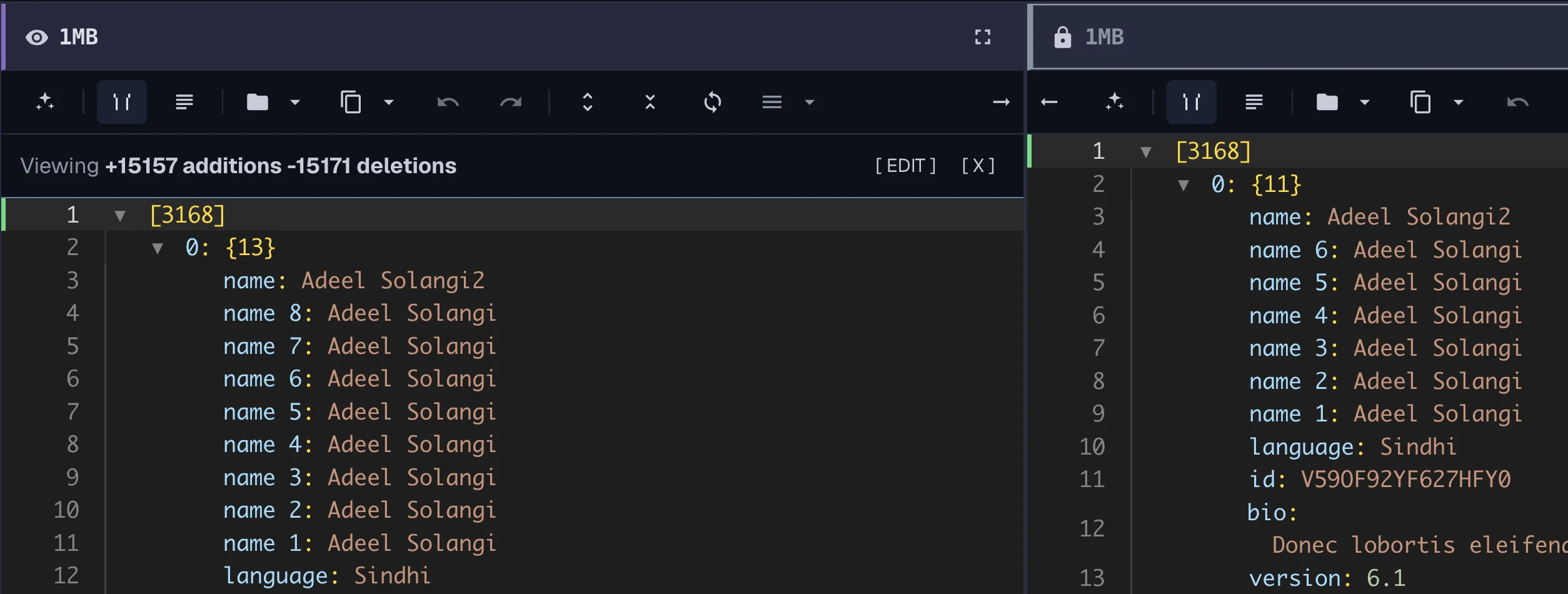
Panels show their mode using:
- Labels
- Colors
- Icons
These help you quickly understand what each panel is doing.
Focus mode
You can maximize a panel to focus on it.
- Hides distractions
- Keeps editing uninterrupted
Things to remember
- Only one panel can edit a document at a time
- Modes change automatically
- Read-only panels protect your data
Learn more:
Advanced: Panel Mode Derivation
For a deeper explanation of how this works, see Advanced: Panel Mode Derivation.
Panel modes are derived from system state.
They are not directly controlled by the user.
Mode priority
When multiple conditions apply, priority is:
- Ownership (who can edit)
- Same-document constraint
- Preview or historical state
- User actions (follow, focus)
Why this works
- Prevents conflicting edits
- Keeps UI consistent
- Ensures predictable behavior
Behavior model
- Editing is granted to one panel
- Other panels adapt automatically
- Mode changes happen instantly when conditions change
For more system details: